
MLRO Checklist
There are a number of tasks that the Money Laundering Reporting Officer (MLRO) in your practice has to complete and review on an annual basis. In this checklist, we provide short video tutorials to show you how to complete these tasks in AML HQ:
- Complete a Firm-wide Business Risk Assessment
- Review and Approve your AML Policies, Controls and Procedures
- Set-up Annual AML Refresher Training for your team
If you are looking for guidance on how to update your AML client files you can find it here.
(1 & 2) Complete a Firm-Wide Business Risk Assessment and Review your Policy, Controls and Procedures
On an annual basis you need to conduct a Firm-Wide business risk assessment in order to identify Money Laundering risks that your firm is exposed to. This is a questionnaire that will ask you questions about type of clients you have and the industries in which they operate along with their geographical location and associations. Where risks are identified you will need to document your appropriate mitigating actions.
The Firm-Wide Business Risk Assessment identifies the risk profile of your practice and everytime you complete a review you need to review your AML Policies, Controls and Procedures to ensure they remain fit for purpose. A review is required on an annual basis or when there is a material change within your practice, such as a change in client base, services provided, geographical location etc.
The following video explains how to review your AML Policies, Controls and Procedures manual and complete a Firm-Wide Business Risk Assessment in AML HQ: Review PCPs and Business Risk Assessments
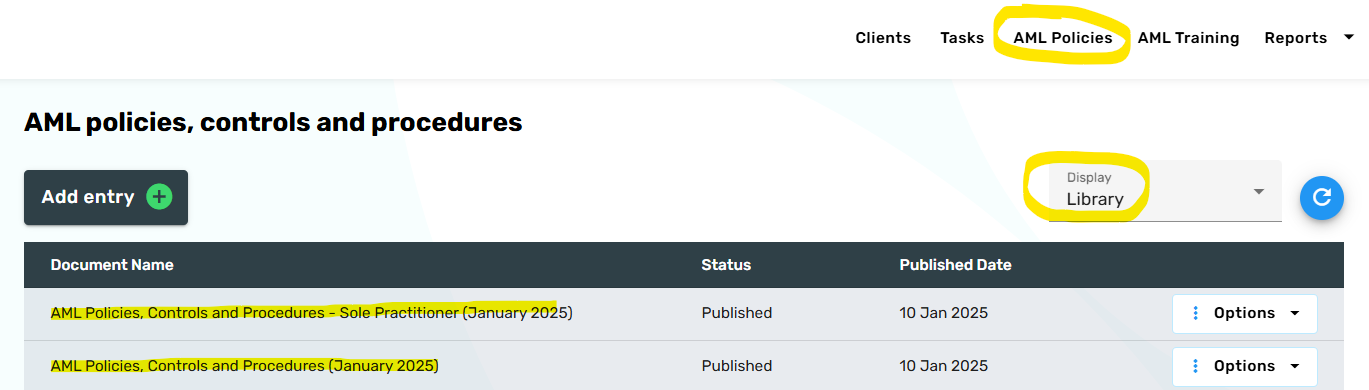
NOTE: In January 2025, we released two new versions of our AML Policies, Controls and Procedures template. The new templates are streamlined and user friendly. There is a version tailored to Sole Practitioners and a seperate version for small to medium size practices. The new versions are available within your policy library within your AML HQ account.
Select "Library" from the dropdown list within the AML Policies section here: https://web.amlhq.com/guidance
(3) AML Training for your team
You and your team need to receive AML training both when they join the practice and on an annual basis.
The following short video explains how to set-up AML training for you and your team: Set-up AML training for staff
Within the above video, we refer to the following training link which you will need when setting up the training course for your team: https://event.on24.com/wcc/r/4173720/24CCA0137FD1F9AD24BD872500203175
After you have set-up the training course, you can send the following link to you team members. It provides a short video tutorial (2 mins) explaining how they can access training and maintain their own training logs: How to access AML training
Note: only Administrators can configure training courses for the team.
AML HQ Support
If you have any questions please use the following support channels that are available to you:
- Email Support: You can email support@amlhq.com
- In App Support: There is a blue question mark in the bottom right hand corner of the AML HQ portal. If you click on the (?) sumbol you can contact support.
- Telephone Support: You can always call (01) 485 3848 and one of the team will be available to support.