
Software Update - 22nd August 2026
On Saturday 22nd August, we updated AML HQ with a number of enhancements. If you would like to request any new features, please contact one of our team directly or send an email to support@amlhq.com.
A summary of the key enhancements included in this release are as follows:
- Quick Add Clients: This new feature allows you to quickly create a client file and send ID and information requests to your client. This is also very handy for new clients that visit you in your office.
- Client AML Declarations: The Client AML Declaration is a mini questionnaire that you can send to your client to complete. It asks them 5 or 6 simple questions, such as if any of the individuals involved are a Politically Exposed Person(PEP), or a high-net worth individual, or about their source of funds/wealth etc. When your client submits their declaration, their answers are automatically inserted into your draft Client Risk Assessment for you to review and complete. Alot of our clients are already using this feature; however, as part of this update, it is now available as a system template on all AML HQ accounts.
- PEP/Sanctions Monitoring [BETA]: We have added the ability to add individuals to a monitor list for PEP/Sanctions/Adverse media events. This is currently available in BETA release and accessible on request.
- Support for Solicitors: The Law Society is currently undertaking a thematic review and Solicitors have until the 30th September to report back with their current Firm-Wide Business Risk Assessment and supporting information. To support the growing number of Solicitors that use AML HQ, we have provided new templates and tools to support their reporting obligations.
- Miscellaneous Updates: We have also made a number of minor UI changes based on client feedback. Please see below for more details.
Keep reading for more information on these changes or get in touch if you would like support or a demo of the new features (support@amlhq.com).
Quick Add Clients
This release introduces the concept of Quick Add Clients where you can create a client file and send out ID verification requests and AML declarations to clients much faster than before. This is also very useful if your new client is present in your office.
You start in the usual way via the Add New Client button.
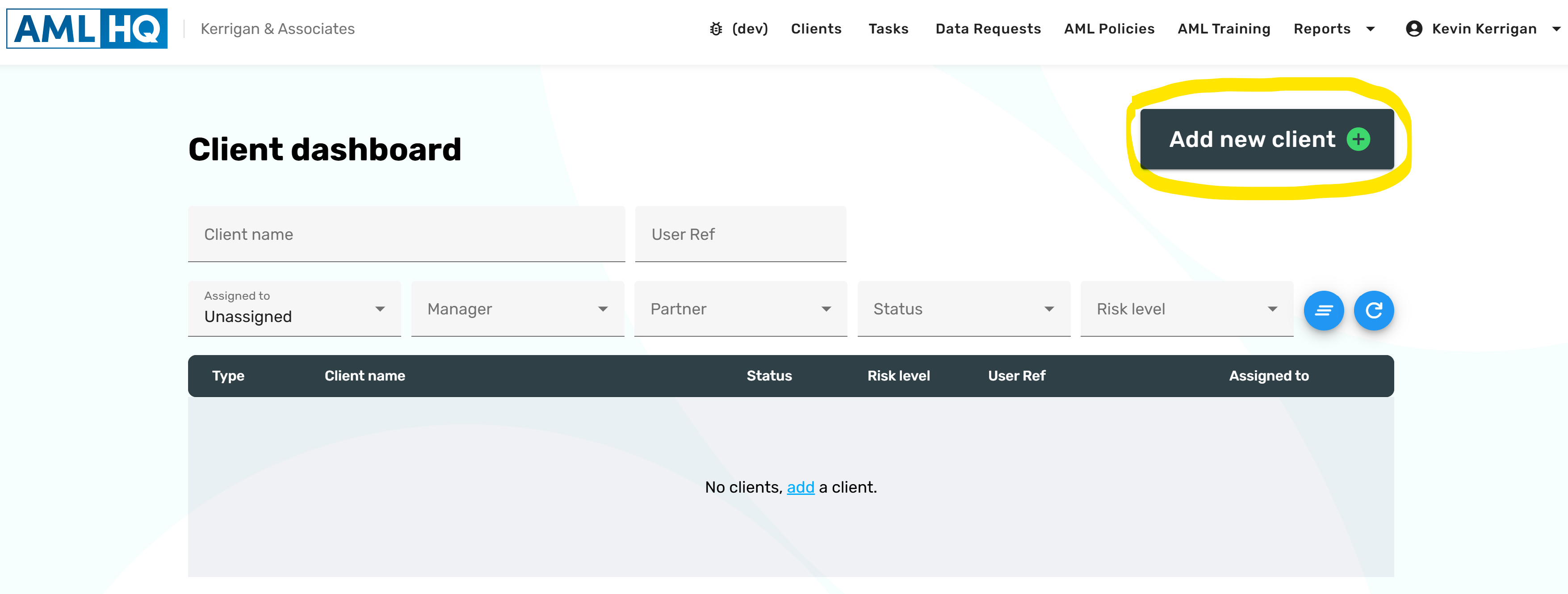
New Menu Options
You will now notice two new Quick Add menu options. The first option is to quick add a Corporate Client and the second is to quick add private individual(s), sole traders or other non-corporate entities.
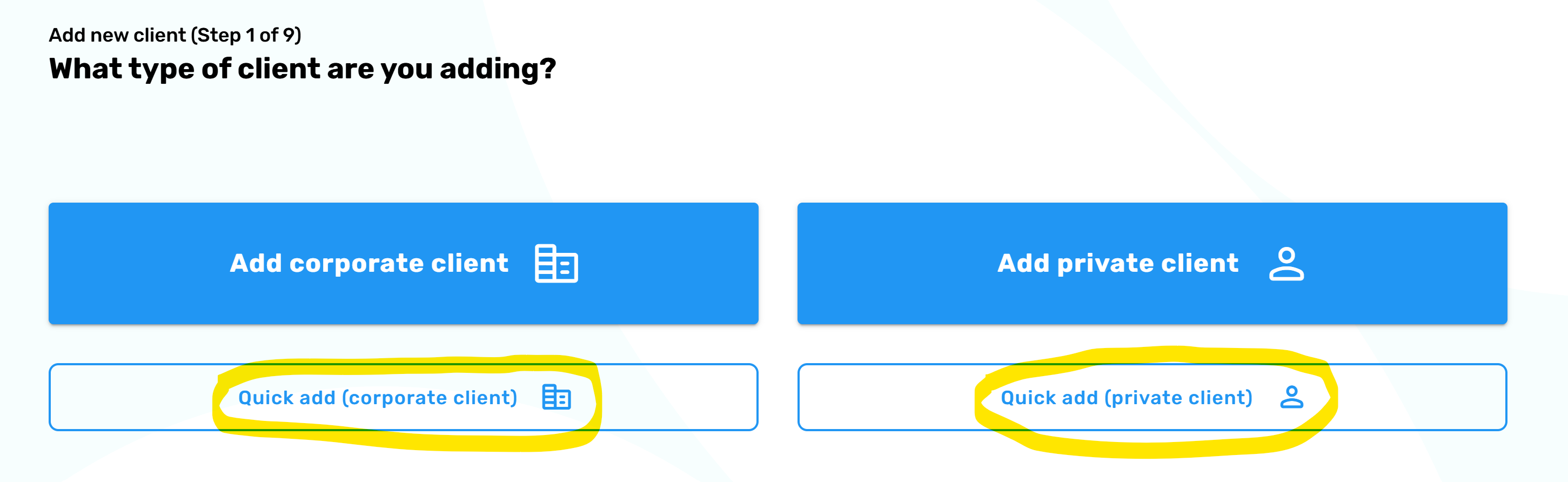
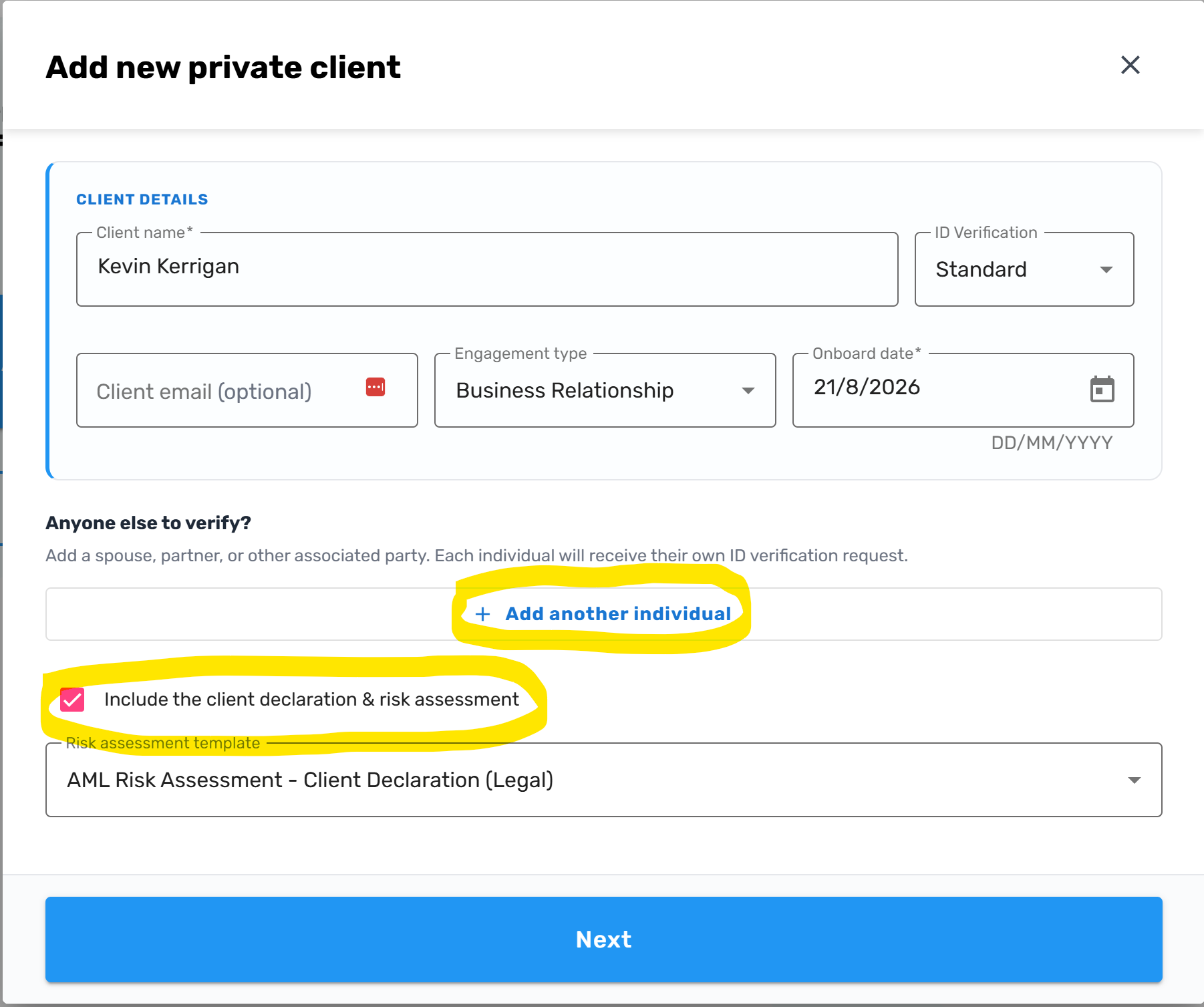
In the following example, I am adding a new private individual. I could have also added other associated parties to the file but in this case I am adding a single individual (Kevin Kerrigan). I have also decided to create the Client Risk Assessment Declaration as part of this client file set-up as I want to send this out to the client for them to complete. This is an optional feature and if I only wanted to send the ID verification request to the client, I would have unticked this option.
NOTE: If you select the Corporate option, you will be able to search for companies via the official Company Registry information. The screen will automatically populate the associated parties and you can decide who you want to Identify and verify before proceeding in the same process as outlined below for private individuals.
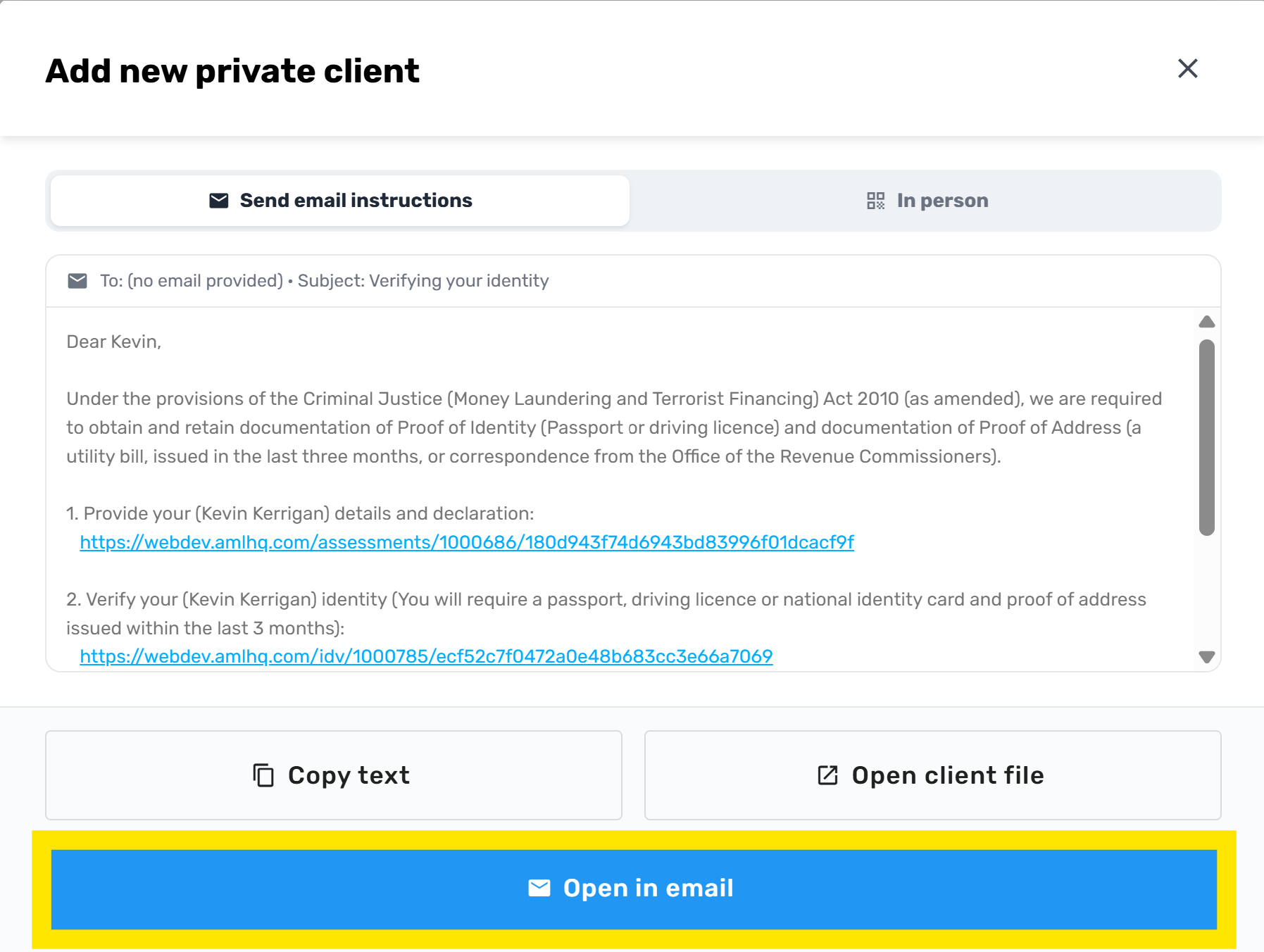
After clicking Next, AML HQ automatically creates the client file. The system drafts an email to send to the client which contains separate links for Identity verification and Client Risk Assessment Declaration. This reduces manual setup and gets the client to provide the required AML information directly.
You will also notice that we have added an Open in email button that allows you to automatically open the draft text in your email client.
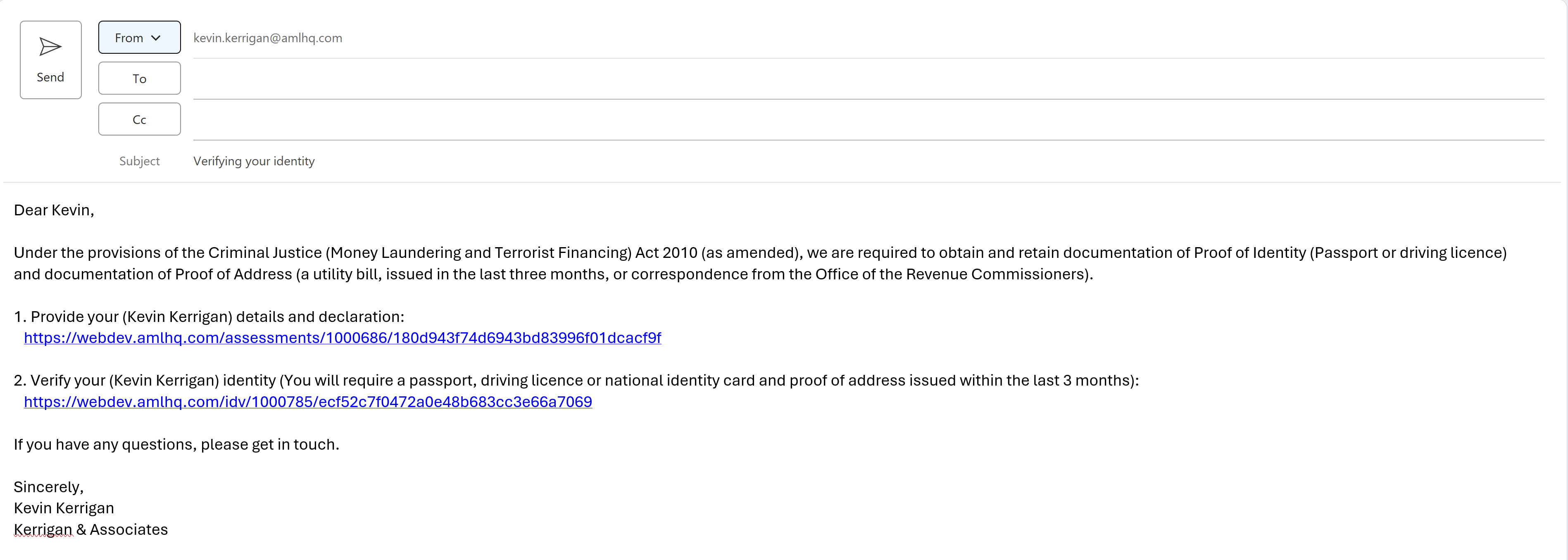
Your clients can now complete these requests as they normally would and you will be notified as per normal (if you have notifications switched on in your account).
What if your new clients visit you at your office?
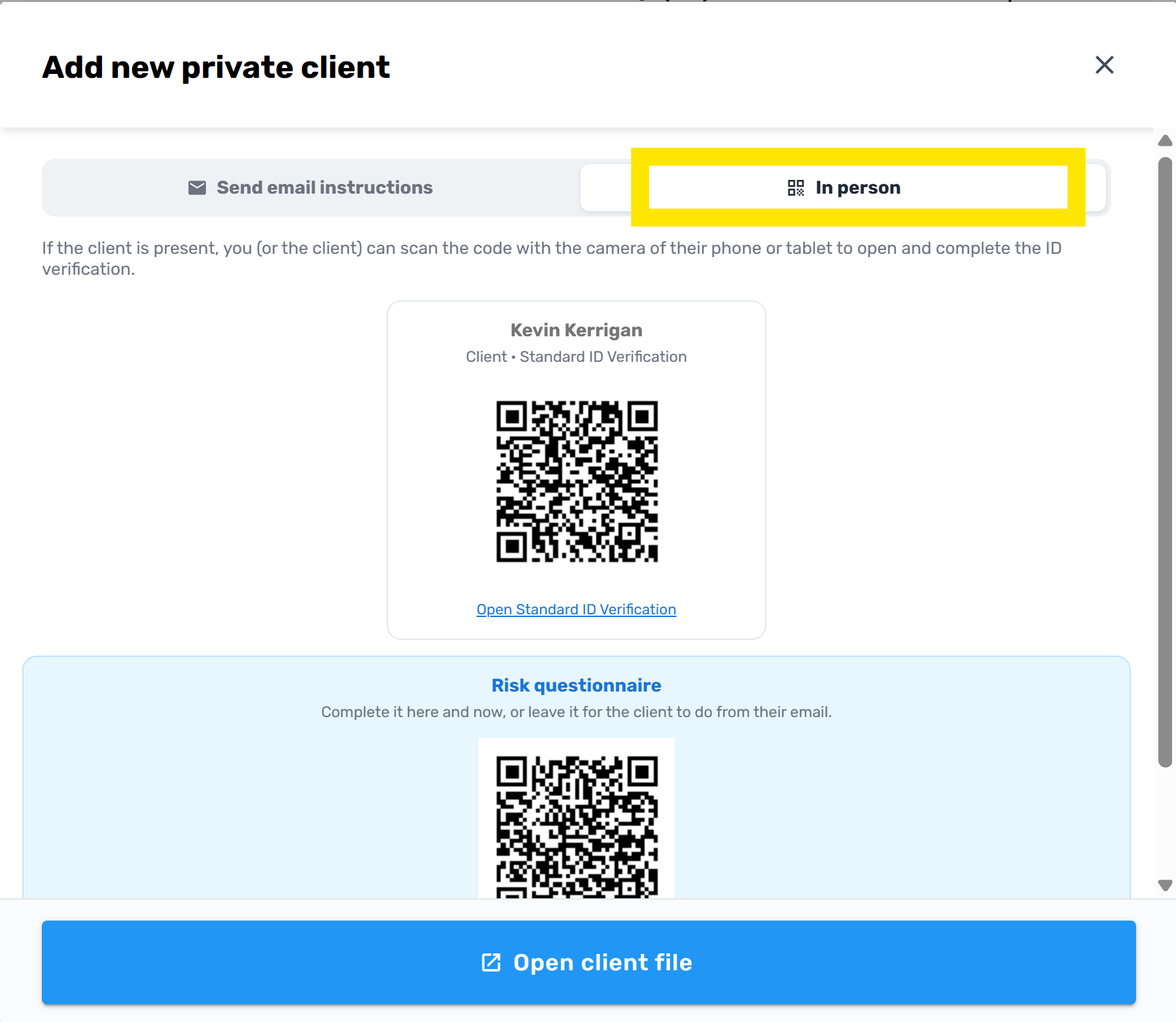
If your new clients are present within your office, you can select the In Person option on the screen and take our your or their phone / tablet and use your camera to scan the on screen QR codes. This will allow them to complete the ID verification in person and save you scanning and linking documents.
Client AML Declarations
The Client AML Declaration is a mini questionnaire that you can send to your client to complete. It asks them 5 or 6 simple questions and allows them to declare if any of the individuals involved are a Politically Exposed Person(PEP), or a high-net worth individual, or provide information about their source of funds/wealth etc.
When your client submits their declaration, their answers are automatically inserted into your draft Client Risk Assessment for you to review and complete. Many of our clients have been using this feature for the past 18 months; however, as part of this update, it is now available as a system template on all AML HQ accounts. This short video explains how this works in practice: Client AML Declarations
PEP/Sanctions Monitoring [BETA]
We have added the ability to add individuals to a monitor list for PEP/Sanctions/Adverse media events. This feature is currently available in BETA release and accessible on request. Please contact support@amlhq.com if you would like more information or would like to use this feature.
The following list summarises how the new feature works:
- The feature is not currently enabled on AML HQ accounts by default. Please contact the support team if you want to use this service.
- When you start a new PEP/Sanctions check you will now have the option to add the individual to a monitor list. You will also be able to add individuals where you have previously completed a PEP/Sanctions check.
- The monitor will run nightly and any potential new matches will be presented to you for review. A task will be created which is your reminder to check the potential match results.
- If you conduct a PEP/Sanctions check and add the individual to the monitor list, then the monitor will only check for new PEP/Sanctions events. If you conduct a PEP/Sanctions and advanced check (Adverse Media etc.) then the monitor will check for new PEP/Sanctions and advanced (Adverse Media etc.) events.
- Costs
- The current cost to conduct a PEP/Sanctions check is €0.50 and to add advanced checks (incl. Adverse media etc.) there is an additional cost of €0.50.
- If you want to add an individual to the monitor list, there is a cost of €1.00. This fee covers the monitoring of the individual for a 1 year period. When adding an individual to the monitor list there is an option to auto-renew the monitor. This means that if there are sufficient credits on the account, the individual's monitor will be automatically renewed when the 1 year period ends.
- Note: If you conduct a new PEP/Sanctions check and you immediately add the client to the monitor list as part of this request; then you will not immediately receive the results as you normally do. You would have to wait until the nightly job completes and then you will receive a task with the results of the search. The benefit of this is that this service costs half the price (€1.00 in total for the annual monitoring). If you want instant results then run the PEP/Sanctions check as you normally would, review the results and then add the individual to the monitor lists (This would cost €1.00 for the initial PEP/Sanctions and an additional €0.50 if you want the advanced search (incl. Adverse media) and then an additional €1.00 for the annual monitoring).
Support for Solicitors
The Law Society is currently undertaking a thematic review and Solicitors have until the 30th of September to report back with their current Firm-Wide Business Risk Assessment and supporting information.
In response to the Law Society’s review we have been working to provide more support to Solicitors. We have created a new Legal Firm-Wide Business Risk Assessment template to meet The Law Society’s reporting deadline. The following video explains how this works: Preparing your Firm-wide Business Risk Assessment
In addition, please check out this short video which shows how our new client onboarding process is tailored for Solicitors: Streamlined AML Onboarding
Miscellaneous Updates
The following minor updates have been applied as part of this release:
- You can now filter/search on client files that are unassigned to staff members, managers or partners clients via the Client Dashboard and Report screens.
- We have added a new client flag type: High Net Worth Individual.
- We have added new client status: Prospect.
- The Company Number Label in the Client Details page is now displayed as Person Number when the client file is not a corporate client.
- Within Identity Verification sessions, the ID and Selfie images now create histories when you manually upload new images. This replicates the functionality that is currently in place when you manually upload a Proof of Address document.
- We have added your Account Name beside the AML HQ logo to make it easy for you to identify which account you are logged into. This is useful for users that operate more than one AML HQ account.
- We now issue a warning dialog when approving and ID Verification if both an ID document and a Proof of Address document is not uploaded.
- When entering your 2FA code (on login) the screen automatically submits and removes the requirement for you to manually click verify
- We have applied some label corrections on the ID Verification PDF. We changed Document country to Nationality to match the fields on the ID review/approval screen.